Back to Integrations
Rootly MCP server
Manage and solve incidents without leaving your IDE by connecting to the Rootly API.
Last updated: 1/27/2026
README
# Rootly MCP Server
[](https://pypi.org/project/rootly-mcp-server/)
[](https://pypi.org/project/rootly-mcp-server/)
[](https://pypi.org/project/rootly-mcp-server/)
[](https://cursor.com/install-mcp?name=rootly&config=eyJjb21tYW5kIjoibnB4IC15IG1jcC1yZW1vdGUgaHR0cHM6Ly9tY3Aucm9vdGx5LmNvbS9zc2UgLS1oZWFkZXIgQXV0aG9yaXphdGlvbjoke1JPT1RMWV9BVVRIX0hFQURFUn0iLCJlbnYiOnsiUk9PVExZX0FVVEhfSEVBREVSIjoiQmVhcmVyIDxZT1VSX1JPT1RMWV9BUElfVE9LRU4%2BIn19)
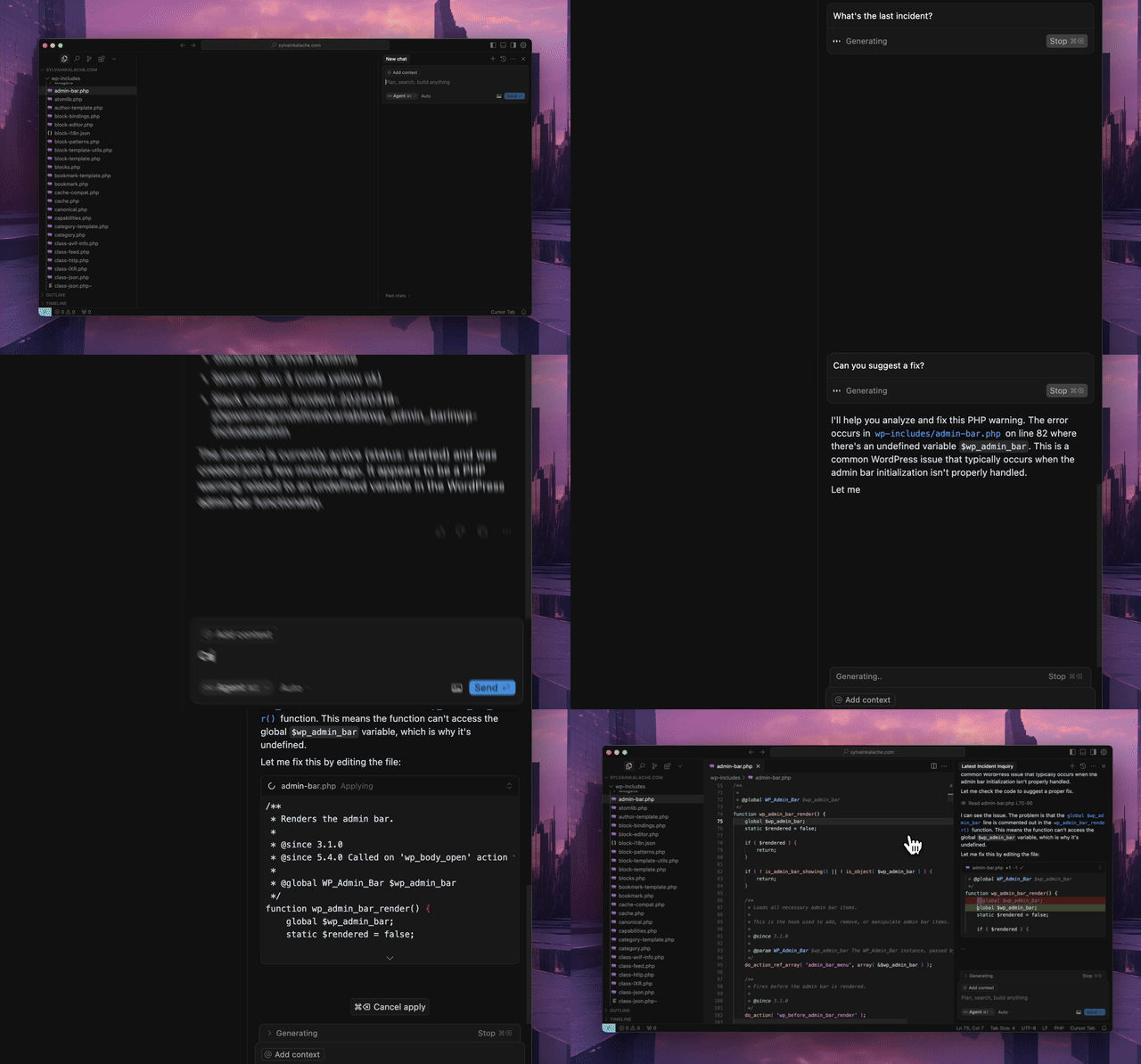
An MCP server for the [Rootly API](https://docs.rootly.com/api-reference/overview) that integrates seamlessly with MCP-compatible editors like Cursor, Windsurf, and Claude. Resolve production incidents in under a minute without leaving your IDE.
## Prerequisites
- Python 3.12 or higher
- `uv` package manager
```bash
curl -LsSf https://astral.sh/uv/install.sh | sh
```
- [Rootly API token](https://docs.rootly.com/api-reference/overview#how-to-generate-an-api-key%3F) with appropriate permissions (see below)
### API Token Permissions
The MCP server requires a Rootly API token. Choose the appropriate token type based on your needs:
- **Global API Key** (Recommended): Full access to all entities across your Rootly instance. Required for organization-wide visibility across teams, schedules, and incidents.
- **Team API Key**: Team Admin permissions with full read/edit access to entities owned by that team. Suitable for team-specific workflows.
- **Personal API Key**: Inherits the permissions of the user who created it. Works for individual use cases but may have limited visibility.
For full functionality of tools like `get_oncall_handoff_summary`, `get_oncall_shift_metrics`, and organization-wide incident search, a **Global API Key** is recommended.
## Installation
Configure your MCP-compatible editor (tested with Cursor) with one of the configurations below. The package will be automatically downloaded and installed when you first open your editor.
### With uv
```json
{
"mcpServers": {
"rootly": {
"command": "uv",
"args": [
"tool",
"run",
"--from",
"rootly-mcp-server",
"rootly-mcp-server"
],
"env": {
"ROOTLY_API_TOKEN": "<YOUR_ROOTLY_API_TOKEN>"
}
}
}
}
```
### With uvx
```json
{
"mcpServers": {
"rootly": {
"command": "uvx",
"args": [
"--from",
"rootly-mcp-server",
"rootly-mcp-server"
],
"env": {
"ROOTLY_API_TOKEN": "<YOUR_ROOTLY_API_TOKEN>"
}
}
}
}
```
To customize `allowed_paths` and access additional Rootly API paths, clone the repository and use this configuration:
```json
{
"mcpServers": {
"rootly": {
"command": "uv",
"args": [
"run",
"--directory",
"/path/to/rootly-mcp-server",
"rootly-mcp-server"
],
"env": {
"ROOTLY_API_TOKEN": "<YOUR_ROOTLY_API_TOKEN>"
}
}
}
}
```
### Connect to Hosted MCP Server
Alternatively, connect directly to our hosted MCP server:
```json
{
"mcpServers": {
"rootly": {
"command": "npx",
"args": [
"-y",
"mcp-remote",
"https://mcp.rootly.com/sse",
"--header",
"Authorization:${ROOTLY_AUTH_HEADER}"
],
"env": {
"ROOTLY_AUTH_HEADER": "Bearer <YOUR_ROOTLY_API_TOKEN>"
}
}
}
}
```
## Features
- **Dynamic Tool Generation**: Automatically creates MCP resources from Rootly's OpenAPI (Swagger) specification
- **Smart Pagination**: Defaults to 10 items per request for incident endpoints to prevent context window overflow
- **API Filtering**: Limits exposed API endpoints for security and performance
- **Intelligent Incident Analysis**: Smart tools that analyze historical incident data
- **`find_related_incidents`**: Uses TF-IDF similarity analysis to find historically similar incidents
- **`suggest_solutions`**: Mines past incident resolutions to recommend actionable solutions
- **MCP Resources**: Exposes incident and team data as structured resources for easy AI reference
- **Intelligent Pattern Recognition**: Automatically identifies services, error types, and resolution patterns
### Available Tools
**Alerts**
- `listIncidentAlerts`
- `listAlerts`
- `attachAlert`
- `createAlert`
**Environments**
- `listEnvironments`
- `createEnvironment`
**Functionalities**
- `listFunctionalities`
- `createFunctionality`
**Workflows**
- `listWorkflows`
- `createWorkflow`
**Incidents**
- `listIncidentActionItems`
- `createIncidentActionItem`
- `listIncident_Types`
- `createIncidentType`
- `search_incidents`
- `find_related_incidents`
- `suggest_solutions`
**On-Call**
- `get_oncall_shift_metrics`
- `get_oncall_handoff_summary`
- `get_shift_incidents`
**Services & Severities**
- `listServices`
- `createService`
- `listSeverities`
- `createSeverity`
**Teams & Users**
- `listTeams`
- `createTeam`
- `listUsers`
- `getCurrentUser`
**Meta**
- `list_endpoints`
### Why Path Limiting?
We limit exposed API paths for two key reasons:
1. **Context Management**: Rootly's comprehensive API can overwhelm AI agents, affecting their ability to perform simple tasks effectively
2. **Security**: Controls which information and actions are accessible through the MCP server
To expose additional paths, modify the `allowed_paths` variable in `src/rootly_mcp_server/server.py`.
### Smart Analysis Tools
The MCP server includes intelligent tools that analyze historical incident data to provide actionable insights:
#### `find_related_incidents`
Finds historically similar incidents using text similarity analysis:
```
find_related_incidents(incident_id="12345", similarity_threshold=0.15, max_results=5)
```
- **Input**: Incident ID, similarity threshold (0.0-1.0), max results
- **Output**: Similar incidents with confidence scores, matched services, and resolution times
- **Use Case**: Get context from past incidents to understand patterns and solutions
#### `suggest_solutions`
Recommends solutions by analyzing how similar incidents were resolved:
```
suggest_solutions(incident_id="12345", max_solutions=3)
# OR for new incidents:
suggest_solutions(incident_title="Payment API errors", incident_description="Users getting 500 errors during checkout")
```
- **Input**: Either incident ID OR title/description text
- **Output**: Actionable solution recommendations with confidence scores and time estimates
- **Use Case**: Get intelligent suggestions based on successful past resolutions
#### How It Works
- **Text Similarity**: Uses TF-IDF vectorization and cosine similarity (scikit-learn)
- **Service Detection**: Automatically identifies affected services from incident text
- **Pattern Recognition**: Finds common error types, resolution patterns, and time estimates
- **Fallback Mode**: Works without ML libraries using keyword-based similarity
- **Solution Mining**: Extracts actionable steps from resolution summaries
#### Data Requirements
For optimal results, ensure your Rootly incidents have descriptive:
- **Titles**: Clear, specific incident descriptions
- **Summaries**: Detailed resolution steps when closing incidents
- **Service Tags**: Proper service identification
Example good resolution summary: `"Restarted auth-service, cleared Redis cache, and increased connection pool from 10 to 50"`
### On-Call Shift Metrics
Get on-call shift metrics for any time period, grouped by user, team, or schedule. Includes primary/secondary role tracking, shift counts, hours, and days on-call.
```
get_oncall_shift_metrics(
start_date="2025-10-01",
end_date="2025-10-31",
group_by="user"
)
```
### On-Call Handoff Summary
Complete handoff: current/next on-call + incidents during shifts.
```python
# All on-call (any timezone)
get_oncall_handoff_summary(
team_ids="team-1,team-2",
timezone="America/Los_Angeles"
)
# Regional filter - only show APAC on-call during APAC business hours
get_oncall_handoff_summary(
timezone="Asia/Tokyo",
filter_by_region=True
)
```
Regional filtering shows only people on-call during business hours (9am-5pm) in the specified timezone.
Returns: `schedules` with `current_oncall`, `next_oncall`, and `shift_incidents`
### Shift Incidents
Incidents during a time period, with filtering by severity/status/tags.
```python
get_shift_incidents(
start_time="2025-10-20T09:00:00Z",
end_time="2025-10-20T17:00:00Z",
severity="critical", # optional
status="resolved", # optional
tags="database,api" # optional
)
```
Returns: `incidents` list + `summary` (counts, avg resolution time, grouping)
## Developer Setup & Troubleshooting
### Prerequisites
- Python 3.12 or higher
- [`uv`](https://github.com/astral-sh/uv) for dependency management
### 1. Set Up Virtual Environment
Create and activate a virtual environment:
```bash
uv venv .venv
source .venv/bin/activate # Always activate before running scripts
```
### 2. Install Dependencies
Install all project dependencies:
```bash
uv pip install .
```
To add new dependencies during development:
```bash
uv pip install <package>
```
### 3. Set Up Git Hooks (Recommended for Contributors)
Install pre-commit hooks to automatically run linting and tests before commits:
```bash
./scripts/setup-hooks.sh
```
This ensures code quality by running:
- Ruff linting
- Pyright type checking
- Unit tests
### 4. Verify Installation
The server should now be ready to use with your MCP-compatible editor.
**For developers:** Additional testing tools are available in the `tests/` directory.
## Play with it on Postman
[<img src="https://run.pstmn.io/button.svg" alt="Run In Postman" style="width: 128px; height: 32px;">](https://god.gw.postman.com/run-collection/45004446-1074ba3c-44fe-40e3-a932-af7c071b96eb?action=collection%2Ffork&source=rip_markdown&collection-url=entityId%3D45004446-1074ba3c-44fe-40e3-a932-af7c071b96eb%26entityType%3Dcollection%26workspaceId%3D4bec6e3c-50a0-4746-85f1-00a703c32f24)
## About Rootly AI Labs
This project was developed by [Rootly AI Labs](https://labs.rootly.ai/), where we're building the future of system reliability and operational excellence. As an open-source incubator, we share ideas, experiment, and rapidly prototype solutions that benefit the entire community.

Installation
Add this MCP to your configuration:
{
  "mcpServers": {
    "rootly-mcp-server": {
      // See GitHub repository for configuration
    }
  }
}
See the GitHub repository for full installation instructions.