Back to AI Assistance
Cua - Computer-Use Agent
This server enables LLMs to run Computer-Use Agent (CUA) workflows on Apple Silicon macOS. It provides asynchronous access to a virtual macOS sandbox environment using Apple’s Virtualization.framework, and supports clients like Cursor, Claude Desktop, and other MCP-compatible tools.
Last updated: 1/27/2026
README
<div align="center">
<a href="https://cua.ai" target="_blank" rel="noopener noreferrer">
<picture>
<source media="(prefers-color-scheme: dark)" alt="Cua logo" width="150" srcset="img/logo_white.svg">
<source media="(prefers-color-scheme: light)" alt="Cua logo" width="150" srcset="img/logo_black.svg">
<img alt="Cua logo" width="150" src="img/logo_black.svg">
</picture>
</a>
<p align="center">Build, benchmark, and deploy agents that use computers</p>
<p align="center">
<a href="https://cua.ai" target="_blank" rel="noopener noreferrer"><img src="https://img.shields.io/badge/cua.ai-0ea5e9" alt="cua.ai"></a>
<a href="https://discord.com/invite/cua-ai" target="_blank" rel="noopener noreferrer"><img src="https://img.shields.io/badge/Discord-Join%20Server-10b981?logo=discord&logoColor=white" alt="Discord"></a>
<a href="https://x.com/trycua" target="_blank" rel="noopener noreferrer"><img src="https://img.shields.io/twitter/follow/trycua?style=social" alt="Twitter"></a>
<a href="https://cua.ai/docs" target="_blank" rel="noopener noreferrer"><img src="https://img.shields.io/badge/Docs-0ea5e9.svg" alt="Documentation"></a>
<br>
<a href="https://trendshift.io/repositories/13685" target="_blank"><img src="https://trendshift.io/api/badge/repositories/13685" alt="trycua%2Fcua | Trendshift" style="width: 250px; height: 55px;" width="250" height="55"/></a>
</p>
</div>
**Cua** is an open-source platform for building, benchmarking, and deploying agents that can use any computer, with isolated, self-hostable sandboxes (Docker, QEMU, Apple Virtualization).
<div align="center">
<video src="https://github.com/user-attachments/assets/c619b4ea-bb8e-4382-860e-f3757e36af20" width="600" controls></video>
</div>
## Choose Your Path
<div align="center">
<table>
<tr>
<td align="center">
<a href="#cua---agentic-ui-automation--code-execution">
<picture>
<source media="(prefers-color-scheme: dark)" srcset="img/card-cua-dark.png">
<source media="(prefers-color-scheme: light)" srcset="img/card-cua-light.png">
<img src="img/card-cua-light.png" alt="Cua" width="280">
</picture>
</a>
</td>
<td align="center">
<a href="#cua-bench---benchmarks--rl-environments">
<picture>
<source media="(prefers-color-scheme: dark)" srcset="img/card-cua-bench-dark.png">
<source media="(prefers-color-scheme: light)" srcset="img/card-cua-bench-light.png">
<img src="img/card-cua-bench-light.png" alt="Cua-Bench" width="280">
</picture>
</a>
</td>
<td align="center">
<a href="#lume---macos-virtualization">
<picture>
<source media="(prefers-color-scheme: dark)" srcset="img/card-lume-dark.png">
<source media="(prefers-color-scheme: light)" srcset="img/card-lume-light.png">
<img src="img/card-lume-light.png" alt="Lume" width="280">
</picture>
</a>
</td>
</tr>
</table>
</div>
---
## Cua - Agentic UI Automation & Code Execution
Build agents that see screens, click buttons, and complete tasks autonomously. Run isolated code execution environments for AI coding assistants like Claude Code, Codex CLI, or OpenCode.
<img src="img/cua-architecture.png" alt="Cua Architecture" width="100%">
```python
# Requires Python 3.12 or 3.13
from computer import Computer
from agent import ComputerAgent
computer = Computer(os_type="linux", provider_type="cloud")
agent = ComputerAgent(model="anthropic/claude-sonnet-4-5-20250929", computer=computer)
async for result in agent.run([{"role": "user", "content": "Open Firefox and search for Cua"}]):
print(result)
```
**[Get Started](https://cua.ai/docs/cua/guide/get-started/set-up-sandbox)** | **[Examples](https://cua.ai/docs/cua/examples)** | **[API Reference](https://cua.ai/docs/cua/reference/agent-sdk)**
---
## Cua-Bench - Benchmarks & RL Environments
Evaluate computer-use agents on OSWorld, ScreenSpot, Windows Arena, and custom tasks. Export trajectories for training.
<img src="img/cua-bench-architecture.png" alt="Cua-Bench Architecture" width="100%">
```bash
# Install and create base image
cd cua-bench
uv tool install -e . && cb image create linux-docker
# Run benchmark with agent
cb run dataset datasets/cua-bench-basic --agent cua-agent --max-parallel 4
```
**[Get Started](https://cua.ai/docs/cuabench/guide/getting-started/first-steps)** | **[Registry](https://cuabench.ai/registry)** | **[CLI Reference](https://cua.ai/docs/cuabench/reference/cli-reference)**
---
## Lume - macOS Virtualization
Create and manage macOS/Linux VMs with near-native performance on Apple Silicon using Apple's Virtualization.Framework.
<img src="img/lume-architecture.png" alt="Lume Architecture" width="100%">
```bash
# Install Lume
/bin/bash -c "$(curl -fsSL https://raw.githubusercontent.com/trycua/cua/main/libs/lume/scripts/install.sh)"
# Pull & start a macOS VM
lume run macos-sequoia-vanilla:latest
```
**[Get Started](https://cua.ai/docs/lume)** | **[FAQ](https://cua.ai/docs/lume/guide/getting-started/faq)** | **[CLI Reference](https://cua.ai/docs/lume/reference/cli-reference)**
---
## Packages
| Package | Description |
| --------------------------------------------------------------------- | ---------------------------------------------------------- |
| [cua-agent](https://cua.ai/docs/cua/reference/agent-sdk) | AI agent framework for computer-use tasks |
| [cua-computer](https://cua.ai/docs/cua/reference/computer-sdk) | SDK for controlling desktop environments |
| [cua-computer-server](https://cua.ai/docs/cua/reference/computer-sdk) | Driver for UI interactions and code execution in sandboxes |
| [cua-bench](https://cua.ai/docs/cuabench) | Benchmarks and RL environments for computer-use |
| [lume](https://cua.ai/docs/lume) | macOS/Linux VM management on Apple Silicon |
| [lumier](https://cua.ai/docs/lume/guide/advanced/lumier) | Docker-compatible interface for Lume VMs |
## Resources
- [Documentation](https://cua.ai/docs) — Guides, examples, and API reference
- [Blog](https://www.cua.ai/blog) — Tutorials, updates, and research
- [Discord](https://discord.com/invite/mVnXXpdE85) — Community support and discussions
- [GitHub Issues](https://github.com/trycua/cua/issues) — Bug reports and feature requests
## Contributing
We welcome contributions! See our [Contributing Guidelines](CONTRIBUTING.md) for details.
## License
MIT License — see [LICENSE](LICENSE.md) for details.
Third-party components have their own licenses:
- [Kasm](libs/kasm/LICENSE) (MIT)
- [OmniParser](https://github.com/microsoft/OmniParser/blob/master/LICENSE) (CC-BY-4.0)
- Optional `cua-agent[omni]` includes ultralytics (AGPL-3.0)
## Trademarks
Apple, macOS, Ubuntu, Canonical, and Microsoft are trademarks of their respective owners. This project is not affiliated with or endorsed by these companies.
---
<div align="center">
[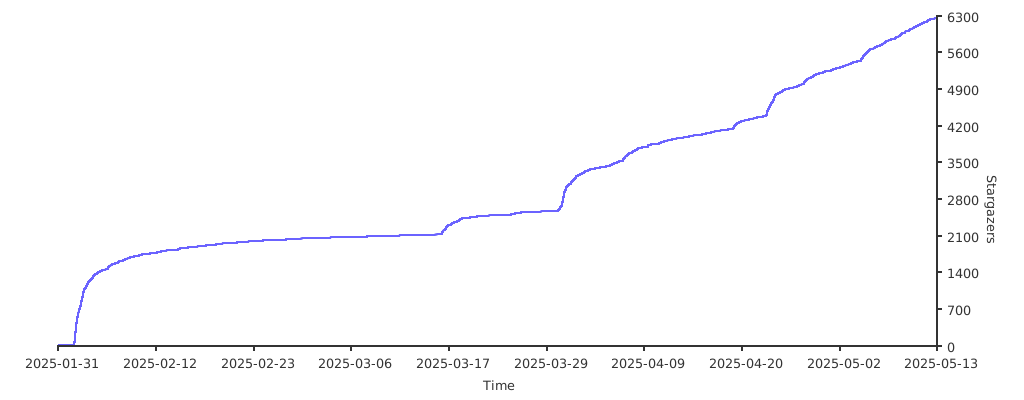](https://starchart.cc/trycua/cua)
Thank you to all our [GitHub Sponsors](https://github.com/sponsors/trycua)!
<img width="300" alt="coderabbit-cli" src="https://github.com/user-attachments/assets/23a98e38-7897-4043-8ef7-eb990520dccc" />
</div>
Installation
Add this MCP to your configuration:
{
  "mcpServers": {
    "cua-computer-use-agent": {
      // See GitHub repository for configuration
    }
  }
}
See the GitHub repository for full installation instructions.